


eSIM Hàn Quốc — Dữ liệu 4G LTE không giới hạn (SKT) / (Chỉ dữ liệu)
eSIM Hàn Quốc — Dữ liệu 4G LTE không giới hạn (SKT) / (Chỉ dữ liệu)
- Mã QR eSIM được gửi qua email ngay sau khi thanh toán
- Tự động kết nối với mạng LG U+ hoặc SKT phù hợp nhất theo vị trí và điều kiện mạng
- Dữ liệu tốc độ cao không giới hạn ngay từ đầu, không giới hạn dung lượng mỗi ngày và không giảm tốc độ do dùng hết dung lượng

Do quy định của địa phương, các mẫu nội địa Trung Quốc (Huawei, Xiaomi, Vivo và iPhone Trung Quốc) không hỗ trợ eSIM. Các thiết bị này không thể sử dụng dịch vụ của chúng tôi, vui lòng không đặt mua.
Điện thoại bị khóa mạng sẽ không thể sử dụng eSIM. Vui lòng mở khóa qua nhà mạng tại quốc gia của bạn TRƯỚC khi đến Hàn Quốc.
LIVING KO không có quyền mở khóa thiết bị và không thể liên hệ với nhà mạng thay bạn. Nếu phát hiện bị khóa sau khi đến Hàn Quốc, bạn phải tự giải quyết trực tiếp với nhà mạng của mình.
Không thể tải thông tin khả dụng để nhận hàng



Korea Travel eSIM
Unlimited Data
Data-only eSIM for Korea with automatic connection to the best available LG U+ or SKT network.
What's Included?
A data-only travel eSIM for use in Korea. Install it only on the phone you will use during your trip.
Your eSIM QR code is sent to your email immediately after checkout. Please check your spam folder if you cannot find it.
Truly unlimited high-speed data from the start, with no daily data cap or quota-based speed reduction. Actual speeds vary by location, network conditions, and device.
Automatically connects to the best available LG U+ or SKT network based on your location and network conditions.
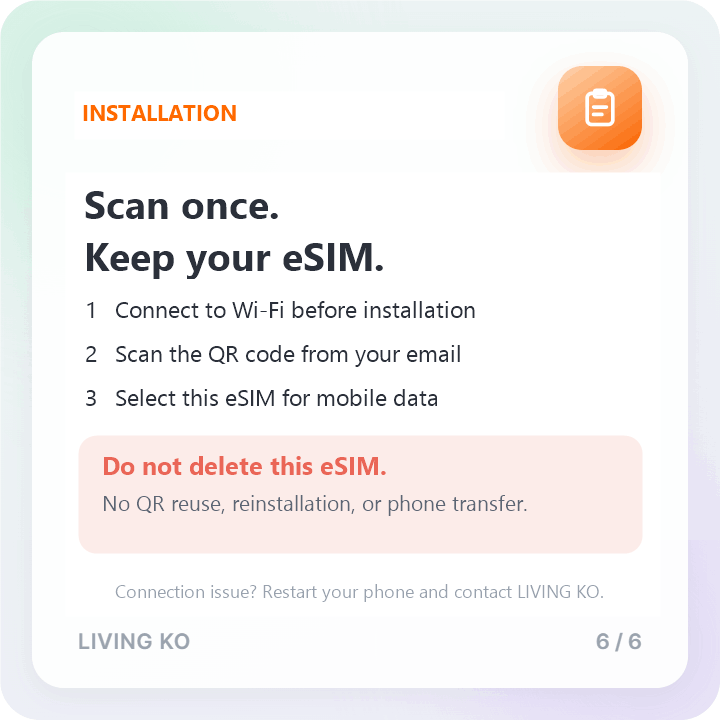
Your QR code can be used only once. Reinstallation after deletion and transfer to another phone are not supported. Do not delete the eSIM if you have a connection issue; contact LIVING KO for help.
Price
Activation Guide
Open Settings → Cellular → Add Cellular Plan

Point your camera at the QR code from your email.

Tap Add Cellular Plan to confirm.
Select the travel eSIM as your mobile data line. The eSIM connects automatically to an available LG U+ or SKT network. Follow the settings in your QR email.
After installation, select the travel eSIM for mobile data and follow the settings in your QR email. If you cannot connect, restart your phone and contact LIVING KO.
Do not delete this eSIM. The QR code can be used only once. Reinstallation after deletion and transfer to another phone are not supported.
Open Settings → Connections
Tap SIM Card Manager
Select Add Mobile Plan → Add Using QR Code

Point your camera at the QR code from your email.
In SIM Card Manager, set the eSIM line as your mobile data line.

After installation, select the travel eSIM for mobile data. The eSIM automatically connects to an available LG U+ or SKT network. Follow the settings in your QR email. If you cannot connect, restart your phone and contact LIVING KO.
Do not delete this eSIM. The QR code can be used only once. Reinstallation after deletion and transfer to another phone are not supported.
Important Notice
Installation: Follow the installation and activation instructions in your QR email. Install only on the phone you will use during your trip.
Device: Unlocked, eSIM-compatible smartphones only. No tablets.
Refund: Available only on the day of purchase if the eSIM is completely unused. No refund is available once the QR code has been scanned.
Single use only: The QR code cannot be reused. After deleting the eSIM, you cannot reinstall it or transfer it to another phone. If you have a connection issue, do not delete the eSIM; contact LIVING KO.
Data only: This plan does not include voice calls, SMS, or Korean mobile identity verification.
Data: Truly unlimited high-speed data from the start, with no daily data cap or quota-based speed reduction. Actual speeds vary by location, network conditions, and device.
FAQ
What is included in this Korea travel eSIM?
This is a digital SIM for travel in Korea. It provides truly unlimited high-speed data from the start of your selected travel period, with no daily data cap or quota-based speed reduction. Actual speeds vary by location, network conditions, and device. It is data-only and does not include voice calls, SMS, or Korean mobile identity verification. Your phone must be unlocked and eSIM-compatible.
How do I buy this eSIM and receive my QR code?
Purchase online, select your travel period, and enter the email address of the person who will use the eSIM. Your QR code is sent to that email immediately after checkout. Please check your spam folder if it does not appear.
Which mobile networks does this eSIM use?
This eSIM supports LG U+ and SKT in Korea and automatically connects to the best available network based on your location and network conditions. Actual speeds vary by location, congestion, and device.
Can I reuse the QR code, reinstall the eSIM, or move it to another phone?
No. The QR code can be used only once. If you delete the eSIM, it cannot be reinstalled, and it cannot be transferred to another phone. Install it only on the phone you will use during your trip. If you have a connection issue, do not delete the eSIM; contact LIVING KO for help.
Can I extend the usage period?
Extensions are not possible. Once your plan expires, you will need to purchase a new eSIM.
How long is the QR code valid before activation?
The QR code is valid for 180 days from the date of purchase.
Can I get a refund if I can't use it?
Refunds are available only on the day of purchase if the eSIM is completely unused. Once the QR code has been scanned, refunds are not available.
How do I install the eSIM on iPhone?
Go to Settings > Cellular (or Mobile Data) > Add eSIM, then scan the QR code from your email and follow the on-screen instructions. Select the travel eSIM as your mobile data line and follow the settings in your QR email. It connects automatically to an available LG U+ or SKT network. The QR code can be used only once. Do not delete the eSIM; it cannot be reinstalled or transferred to another phone.
How do I install the eSIM on Android?
Go to Settings > Connections > SIM Manager > Add eSIM (menu names vary by device), then scan the QR code from your email and follow the on-screen instructions. Select the travel eSIM as your mobile data line and follow the settings in your QR email. It connects automatically to an available LG U+ or SKT network. The QR code can be used only once. Do not delete the eSIM; it cannot be reinstalled or transferred to another phone.
