


Korea eSIM — Unlimited 4G LTE Data (SKT) /(Data Only)
Korea eSIM — Unlimited 4G LTE Data (SKT) /(Data Only)
- Email delivery is processed within an hour
- Runs on SK Telecom Network
- Activate at Incheon Airport upon arrival in Korea (using airport Wi-Fi)

Mainland China domestic models (Huawei, Xiaomi, Vivo, and Chinese iPhones) do not support eSIM due to local regulations. These devices cannot use this service, so please do not purchase.
A carrier-locked phone cannot use eSIM. You must unlock it through your home mobile provider BEFORE departing for Korea.
LIVING KO has no authority to unlock any device and cannot contact your provider on your behalf. If you discover the lock after arriving in Korea, you must resolve it directly with your home provider.
Couldn't load pickup availability



Korea eSIM
Unlimited 4G LTE Data
Powered by SK Telecom — Korea's #1 Network
What's Included?
Buy and set up your eSIM before you leave home — no hunting for a SIM after you land. The instant you arrive in Korea, your phone is already online. No searching, no queues, no waiting to get connected.
Your eSIM QR code arrives in your inbox the moment your purchase is complete — no shipping, no waiting, just instant access when you need it.
Please note: on weekends or outside business hours, delivery may take a few hours, and up to 1–2 business days at most.
Powered by SK Telecom, Korea's #1 mobile carrier. Full speed data with absolutely no speed reduction — stream, navigate, and video call all day long.
Mobile hotspot (tethering) is fully supported. Share your unlimited data with friends, family, or your laptop at no extra cost.
The usage period is calculated from the actual start of internet use — not the purchase date. Example: Buy on June 1st, scan QR at 10AM on June 4th → use until 10AM on June 9th.
Price
Activation Guide
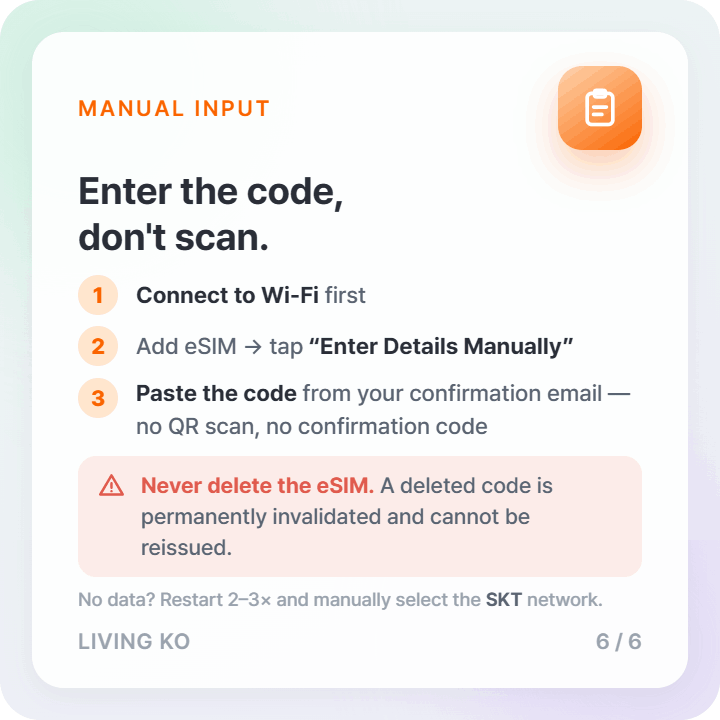
Open Settings → Cellular → Add Cellular Plan

Point your camera at the QR code from your email.

Tap Add Cellular Plan to confirm.
Reboot 1–2 times until carrier shows SKT. If 3G shows, reboot once more.
After installation: Reboot 1–2 times. Confirm carrier shows SKT. If 3G, reboot once more for LTE.
Open Settings → Connections
Tap SIM Card Manager
Select Add Mobile Plan → Add Using QR Code

Point your camera at the QR code from your email.
In SIM Card Manager, set the eSIM line as your mobile data line.

After installation: Reboot 1–2 times. Set eSIM as data line. Confirm SKT. If 3G, reboot once more.
Important Notice
Activation Timing: Usage period starts from the moment the QR code is scanned.
Device: Unlocked, eSIM-compatible smartphones only. No tablets.
Refund: Not available after QR code has been issued.
FAQ
What is eSIM?
eSIM stands for Embedded Subscriber Identity Module. Unlike a physical SIM card that you can insert and remove, an eSIM is a virtual SIM built directly into your smartphone — no hardware needed.
How do I buy this eSIM?
You can purchase it online directly from our store. Your QR code will be sent to your email instantly after checkout.
When does my data plan start counting?
Your usage period starts the exact moment you scan and install the QR code — not the date of purchase. It is calculated in 24-hour increments.
Example: If you scan at 3:00 PM on May 1st, a 5-day plan expires at 3:00 PM on May 6th.
Can I scan the QR code before arriving in Korea?
No. The QR code must be scanned inside Korea under a WiFi connection. We recommend using the free WiFi at Incheon Airport.
Can I extend the usage period?
Extensions are not possible. Once your plan expires, you will need to purchase a new eSIM.
How long is the QR code valid before activation?
The QR code is valid for 180 days from the date of purchase.
Can I get a refund if I can't use it?
Refunds are available only if the product is completely unused on the same day of purchase. Once the QR code has been scanned, refunds are not available. Additionally, refunds cannot be processed more than 30 days after payment per card company policy.
How do I install the eSIM on iPhone?
Go to Settings → Cellular → Add Cellular Plan → scan the QR code from your email → tap Add Cellular Plan to confirm. Reboot your device 1–2 times and confirm the carrier shows "SKT". If you see 3G instead of LTE, reboot once more.
How do I install the eSIM on Android?
Go to Settings → Connections → SIM Card Manager → Add Mobile Plan → Add Using QR Code → scan the QR code from your email. Then set the eSIM line as your mobile data line. Reboot 1–2 times and confirm the carrier shows "SKT". If you see 3G, reboot once more for LTE.
